Using Strings For Incident Investigation?

What is Strings?

Strings is a tool which is used to extract string (Text) from a program or any other file. By default it extracts a string having a minimum of 4 charterers (but this can be changed by using the -n switch).

How does the Strings work?

Strings can be helpful to find out any text (such as url’s). Even though Strings is a really helpful tool but can not be completely relied upon. you can not rely on Strings solely because the attacker also knows that you might use Strings therefore can plant false flags in the program to confuse or derail you from your analysis.

How does the Strings work?

  1. Open CMD/Powershell (from Windows) or Terminal (*NIX)
  2. Go to the directory where you have saved the Strings program (Downloads in this case)
  3. Use Strings
    • Syntax: ./strings.exe

Examples:

  1. Here we have used strings on the strings software itself.

2. Here we have used strings on the Eula.txt file.

Using Regshot For Incident Investigation?

What is Regshot?

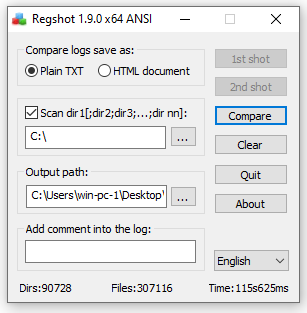
Regshot is a tool typically used for dynamic malware analysis. Even though the tool is typically used to analyse the malware changes but it can be used to track any changes made in the file system and the registry.

How does the Regshot work?

  1. We choose the result file format (In this case: plain txt file)
  2. check the scan directory check mark (In this case the whole ‘C:/’ drive)
  3. Choose the output location for the file (In this case the Desktop)
  4. Add any comments you would like to be in the logs (None in this case)
  5. Click on the 1st shot & choose shot or shot & save (I did a shot)
  6. Install the software or make any change you want (I installed VS code)

6. When you see the 2nd shot button click it and choose shot or shot & save (I did a shot)

7. Click compare, it will open the notepad file and then you can find all the changed in that notepad file.

What is Unpatched softwares or systems & How To Defend Against It

What is Unpatched softwares or systems?

Sometime companies use the old versions of the softwares that have multiple exploits that are already written and are easily available on the web (usually they use that vulnerable version of the softwares because updating it might cause problems with the other softwares depending on it in the environment).

How to defend against the Unpatched softwares or systems?

  • Implement a patch management process.
  • Remove unnecessary features and dependencies.
  • Continuously monitor sources like CVEs for vulnerabilities in the systems.
  • Subscribe to email alerts for security vulnerabilities related to components you use.
  • Just use secured links to get products through official sources. To reduce the risk of a changed, malicious element being included, prefer signed packages.
  • Monitor for libraries and components that are unmaintained.
  • For the lifetime of the application, the company must insure that there is an ongoing process for monitoring, triaging, and implementing updates or configuration changes.


What is Cookie Stealing & How To defend against It

What is Cookie Stealing?

Cookies are small bits of data on how you respond and interact with a website. Cookie Stealing is exploitation of a valid computer session to gain unauthorized access to the Web Server.

The most common ways to compromise a session token are:

  • Predictable session token.
  • Session Sniffing.
  • Client-side attacks.
  • Man-in-the-middle attack.

How to defend against Cookie Stealing?

  • Use SSL certificate (HTTPS protocol).
  • keep your web-app up to date.
  • Use strong usernames and passwords.
  • Use MFA.
  • Block PHP execution.
  • Use Anti-Virus.
  • Do not click on suspicious links.
  • Avoid storing sensitive data.
  • don’t use predictable cookies.


What Is A Phishing Attack & How To Defend Against It

What is Phishing?

Phishing is when a attacker convinces you to be someone that they are not and ask for you personal information. They can more easily infect you with malware or steal your credit card details by impersonating someone you trust.

Example Scenario:

You receive an email from the bank containing a bank URL to goto
You click on the URL and the page opens
You sign in the bank account
The page loads again and you go to a random page related to the bank

In the back end when you sign in the creds are forwarded to the attacker in clear text and then the attacker redirects you to the actual bank website.

How to defend against the Broken Access Control?

  • Staff training.
  • Never trust anyone and do verify before giving out any data.
  • Dont visit random links.
  • Dont open unknown attachments.
  • Implement technologies that scans the attachments or checks the links (such as safe links and safe attachments in MS Azure).
  • Report to relevant person if you have clicked on the suspicious link so that the security team can verify and then proceed with their troubleshooting if necessary.
  • Use MFA.


What is Insufficient Logging & Monitoring & How To Improve It

What is Insufficient Logging & Monitoring?

Logging is essential because it enables the attacker’s actions to be tracked in the event of an incident. Their risk and effect can be calculated once their activities are traced. There would be no way to say what activities an intruder took if they gained access to specific web applications without logging. Since these logs contain confidential data, it is important to make sure that they are stored safely and that several copies of these logs are kept in separate locations. Even though logging is essential but it is helpful after a breach not before, or while a breach. to defend our self in the first place we need to ensure that we have Monitoring and Detection systems in place to catch and alert the teams (if needed or else the play books can be automated) when the suspicious activity is detected.

The information should be stored in the logs:

  • Time stamps.
  • User accounts.
  • API endpoints/page locations.
  • IP addresses.
  • Requests made.
  • Responses sent.

Common examples of suspicious activity includes:

  • Multiple unauthorized attempts for a particular action.
  • Requests from anomalous IP addresses or locations.
  • Use of automated tools.
  • Common payloads attempts.

How to Improve Logging & Monitoring?

  • Ensure all login, access control failures, and server-side input validation failures can be logged.
  • Ensure that logs are generated in a format that can be easily consumed by a centralized log management solutions.
  • Ensure high-value transactions have an audit trail with integrity controls to prevent tampering or deletion, (such as append-only database tables).
  • Establish effective monitoring, detecting and alerting mechanism.
  • Establish or adopt an incident response and recovery plan.
Examining the logs after a pen-test is one technique for deciding whether you have enough monitoring. The actions of the testers should be clearly documented in order to determine the extent of any harm they may have caused. 


What is Man-In-The-Middle (MITM) Attack & How To defend against It

What is MITM?

A MITM attack is when an attacker intercepts communications between two parties either to secretly go through or modify data going from one end to another. Attackers might use MITM attacks to steal login credentials or personal information.

Types Of MITM Attacks:

  • Rogue Access Point.
  • ARP Spoofing.
  • DNS Spoofing.
  • Multicast DNS Spoofing.

Common MITM Techniques:

  • Packet Sniffing.
  • Packet Injection.
  • Cookie Stealing.
  • SSL Stripping.

How to defend against MITM?

  • Use strong encryption.
  • Strong router login creds.
  • Use VPNs.
  • Force HTTPS protocol over HTTP.
  • Public Key Pair Based Authentication.


What is a Remote Access Trojan (RAT) & How To defend against It

What is RAT?

A RAT is a form of malware that lets attackers track and control your machine remotely.

How to defend against RAT?

  • Use anti virus.
  • Download softwares using safe and official links over a secure protocol. Prefer to download a signed image of the software to make sure there is no changes made in the software while in transit.
  • Dont open unknown email attachments & links.
  • Keep your browser and operating system up-to-date with security patches.


What is Insider Threat & How To defend against It

What is Insider Threat?

Employees, former employees, contractors, or business associates who have legitimate access to your systems and data but can use that access to kill or steal your data or systems are known as insider threats. Insiders may turn malicious for a variety of reasons, such as revenge, manipulation, ideology, ego, or monetary benefit via intellectual property theft.

How do I prevent a Insider Threat?

There are a variety of ways to defend yourself from malicious insiders, depending on the organization, systems, culture, environment, and how well this information is communicated and understood by employees.

 Technical Controls:

  • Control removable storage
  • Control outbound emails and files
  • Backups
  • Require strong passwords and multi-factor authentication
  • Recycle your old hardware and documentation properly (Remove all data before recycling)

 Access Controls:

  • Implement concept of least-privileged access
  • Use unique logons
  • Deactivate unnecessary access
  • Implement Auditing and logging
  • Establish physical security in the work environment
  • Enforce separation of duties

 Business Processes:

  • Do a comprehensive background check before hiring any IT admins because they have powerfull administrative access
  • Staff training
  • Improve work culture
  • Enable surveillance

What is a Ransomware & How to Defend Against It

What is a Ransomware?

Ransomware is a form of malware that encrypts a victim’s data. The attacker then asks for ransom. Once the ransom is paid the the user access to data is restored..

How to defend against Ransomware?

  • Keep your operating system patched and up-to-date.
  • If you don’t know what you’re doing, don’t install software or grant it administrative rights.
  • Use antivirus software.
  • Back up your files, regularly and automatically. Even though this will not prevent you from an attack, it will significantly reduce the harm it does.