What is Rust?

Introduction

Rust is a programming language created in 2015 by a small team of people, and later adopted by Mozilla.

It is a compiled low-level language, which aims to be as fast as C or C++, while incorporating some features from high-level languages such as Go, Python, or JavaScript.

Rust has three main goals:

  • Performance
  • Safety
  • Productivity

Performance

Rust aims to achieve performance similar to C or C++.

Rust is statically typed, which means the data type of a variable is known at compile time. This allows the compiler to optimize the code further than if we didn’t know the types.

Rust does not use garbage collection (despite being a low-level programming language). Garbage collection is where the program attempts to reclaim memory from objects no longer in use by the program.

Unlike languages like Python and JavaScript, Rust avoids these abstractions to minimize issues, making it a preferred choice for low-level programming.

Safety

Rust is designed to be completely memory safe. This means that memory-related exploits aren’t possible in Rust, unless you explicitly specify unsafe Rust code.

The Microsoft Security Response Centre reports that 70% of all CVEs assigned are memory safety issues. Microsoft states:

“This means that if that software had been written in Rust, 70% of these security issues would most likely have been eliminated. And we’re not the only company to have reported such findings.”

Rust provides tools to wrap unsafe actions, enabling static enforcement of unsafe code by the Rust compiler.

The memory safety is guaranteed by the concept of ownership, governed by these rules:

  • Each value has a variable, called an owner.
  • There can only be one owner at a time.
  • When the owner goes out of scope, the value will be dropped.

Values can be moved or borrowed between variables, but no value can have more than one owner.

Consider an example in Python:z

squares = (val * val for val in range(100))
print(min(squares))
print(max(squares))

What we want is:

0
9801

But what we get is:

>>> print(min(squares))
0
>>> print(max(squares))
Traceback (most recent call last):
  File "", line 1, in 
ValueError: max() arg is an empty sequence

This is because min alters the variable squares. It’s strange, because we just wanted the minimum — not to alter the whole variable!

In Rust, the same code is:

fn main()
   let squares = (0..100).map(|val| val * val);
   println!("{:?}", squares.min());
   println!("{:?}", squares.max());
}

When we try to compile this, Rust tells us:

error[E0382]: use of moved value: `squares`
 --> ownership.rs:4:21
  |
3 |    println!("{:?}", squares.min());
  |                     ------- value moved here
4 |    println!("{:?}", squares.max());
  |                     ^^^^^^^ value used here after move
  |
  = note: move occurs because `squares` has type `std::iter::Map<std::ops::Range, [closure@ownership.rs:2:31: 2:40]>`, which does not implement the `Copy` trait

The important part here is that Python allows functions to alter variables they do not own, whereas Rust doesn’t.

Productivity

Rust’s third major goal is productivity, and it provides a rich set of tools to support developers.

Note: The below list is read as:

  • Tool

Explanation of the above tool.

Some of these tools include:

  • Cargo

Rust’s version of NPM or PyPi. Download packages others have created.

  • Clippy

Microsoft Clippy, but re-imagined for Rust to aid with development.

  • RustFmt

Automatically formats Rust code.

  • Cargo Test

A built-in testing application created by the Rust developers.

  • Cargo docs

Automatically generates documentation for your code using documentation comments (written in Markdown). This documentation is then sent to docs.rs upon publishing to Cargo. Moreover, examples in documentation are automatically tested for you, eliminating untested documentation examples.

  • Rust-Analyzer

Rust Analyzer is like an intelligent IDE. It clearly labels what’s wrong with your code, explains why it’s wrong, points out the exact characters causing errors, and often provides an “auto-fix” function that rectifies errors automatically.

  • The Rust Book & Docs

Rust offers a comprehensive book called The Book, which covers everything you need to know about Rust. Neatly divided into chapters, it’s easily searchable and available for free. Additionally, due to Rust’s documentation comments, most libraries you use will have extensive documentation online.

With these tools at your disposal, compiling a Rust program and encountering bugs is incredibly rare. The tooling and language usually catch issues long before you hit the compile button.

Conclusion

If you are seeking exceptional speed, memory safety, and enhanced productivity, Rust is the language you’ve been looking for.

As Pentesters, part of our job is to provide solutions to developers. While suggesting a low-level language like Rust to Python developers might seem unconventional initially, Rust offers robust support, even allowing calls from functions written in other languages through foreign function interfacing.

We can leverage Rust to rewrite security or performance-critical code that seamlessly integrates with our existing codebase.

Here’s an example of calling C code:

extern "C" {
    fn abs(input: i32) -> i32;
}

fn main() {
    unsafe {
        println!("C believes that the absolute value of -3 is: {}", abs(-3));
    }
}

Using Strings For Incident Investigation?

What is Strings?

Strings is a tool which is used to extract string (Text) from a program or any other file. By default it extracts a string having a minimum of 4 charterers (but this can be changed by using the -n switch).

How does the Strings work?

Strings can be helpful to find out any text (such as url’s). Even though Strings is a really helpful tool but can not be completely relied upon. you can not rely on Strings solely because the attacker also knows that you might use Strings therefore can plant false flags in the program to confuse or derail you from your analysis.

How does the Strings work?

  1. Open CMD/Powershell (from Windows) or Terminal (*NIX)
  2. Go to the directory where you have saved the Strings program (Downloads in this case)
  3. Use Strings
    • Syntax: ./strings.exe

Examples:

  1. Here we have used strings on the strings software itself.

2. Here we have used strings on the Eula.txt file.

Using Regshot For Incident Investigation?

What is Regshot?

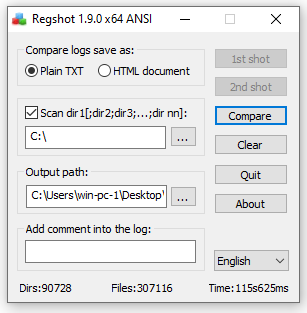
Regshot is a tool typically used for dynamic malware analysis. Even though the tool is typically used to analyse the malware changes but it can be used to track any changes made in the file system and the registry.

How does the Regshot work?

  1. We choose the result file format (In this case: plain txt file)
  2. check the scan directory check mark (In this case the whole ‘C:/’ drive)
  3. Choose the output location for the file (In this case the Desktop)
  4. Add any comments you would like to be in the logs (None in this case)
  5. Click on the 1st shot & choose shot or shot & save (I did a shot)
  6. Install the software or make any change you want (I installed VS code)

6. When you see the 2nd shot button click it and choose shot or shot & save (I did a shot)

7. Click compare, it will open the notepad file and then you can find all the changed in that notepad file.

Using Tasklist For Incident Investigation?

What is Tasklist?

Tasklist is a command-line tool that displays a list of currently running processes on the computer.


Common Commands:

tasklist

::: This command just shows the basic details about the running tasks. :::

tasklist /v

::: This command shows the active tasks with the verbose output about the verbose information. The following parameter and the meaning:

/v – Shows verbose task information :::

Click here to find some more parameters for Tasklist:

https://docs.microsoft.com/en-us/windows-server/administration/windows-commands/tasklist#parametersh

Using Netstat For Incident Investigation?

What is Netstat?

Netstat is a command-line network utility that displays network connections from a device.


Common Commands:

netstat

::: This command just shows the basic network connections :::

netstat -nao

::: This command shows the network connections with the process ID (PID) (Later we can track those PID to the image running using the tasklist command or on the Processes tab in Windows Task Manager). The following parameters and the meaning:

-n – no DNS resolves

-a – Displays all active TCP connections and the TCP and UDP ports

-o – This command shows the PID for each connection :::

netstat -naob

::: This command shows the network connections with the with the parent binary image that owns that process. The following parameters and the meaning:

-n – no DNS resolves

-a – Displays all active TCP connections and the TCP and UDP ports

-o – This command shows the PID for each connection

-b – This command shows the parent binary image that owns that process :::

Click here to find some more parameters for Netstat:

https://en.wikipedia.org/wiki/Netstat#Parameters

What is Unpatched softwares or systems & How To Defend Against It

What is Unpatched softwares or systems?

Sometime companies use the old versions of the softwares that have multiple exploits that are already written and are easily available on the web (usually they use that vulnerable version of the softwares because updating it might cause problems with the other softwares depending on it in the environment).

How to defend against the Unpatched softwares or systems?

  • Implement a patch management process.
  • Remove unnecessary features and dependencies.
  • Continuously monitor sources like CVEs for vulnerabilities in the systems.
  • Subscribe to email alerts for security vulnerabilities related to components you use.
  • Just use secured links to get products through official sources. To reduce the risk of a changed, malicious element being included, prefer signed packages.
  • Monitor for libraries and components that are unmaintained.
  • For the lifetime of the application, the company must insure that there is an ongoing process for monitoring, triaging, and implementing updates or configuration changes.


What is Cookie Stealing & How To defend against It

What is Cookie Stealing?

Cookies are small bits of data on how you respond and interact with a website. Cookie Stealing is exploitation of a valid computer session to gain unauthorized access to the Web Server.

The most common ways to compromise a session token are:

  • Predictable session token.
  • Session Sniffing.
  • Client-side attacks.
  • Man-in-the-middle attack.

How to defend against Cookie Stealing?

  • Use SSL certificate (HTTPS protocol).
  • keep your web-app up to date.
  • Use strong usernames and passwords.
  • Use MFA.
  • Block PHP execution.
  • Use Anti-Virus.
  • Do not click on suspicious links.
  • Avoid storing sensitive data.
  • don’t use predictable cookies.


What Is A Phishing Attack & How To Defend Against It

What is Phishing?

Phishing is when a attacker convinces you to be someone that they are not and ask for you personal information. They can more easily infect you with malware or steal your credit card details by impersonating someone you trust.

Example Scenario:

You receive an email from the bank containing a bank URL to goto
You click on the URL and the page opens
You sign in the bank account
The page loads again and you go to a random page related to the bank

In the back end when you sign in the creds are forwarded to the attacker in clear text and then the attacker redirects you to the actual bank website.

How to defend against the Broken Access Control?

  • Staff training.
  • Never trust anyone and do verify before giving out any data.
  • Dont visit random links.
  • Dont open unknown attachments.
  • Implement technologies that scans the attachments or checks the links (such as safe links and safe attachments in MS Azure).
  • Report to relevant person if you have clicked on the suspicious link so that the security team can verify and then proceed with their troubleshooting if necessary.
  • Use MFA.


What is Insufficient Logging & Monitoring & How To Improve It

What is Insufficient Logging & Monitoring?

Logging is essential because it enables the attacker’s actions to be tracked in the event of an incident. Their risk and effect can be calculated once their activities are traced. There would be no way to say what activities an intruder took if they gained access to specific web applications without logging. Since these logs contain confidential data, it is important to make sure that they are stored safely and that several copies of these logs are kept in separate locations. Even though logging is essential but it is helpful after a breach not before, or while a breach. to defend our self in the first place we need to ensure that we have Monitoring and Detection systems in place to catch and alert the teams (if needed or else the play books can be automated) when the suspicious activity is detected.

The information should be stored in the logs:

  • Time stamps.
  • User accounts.
  • API endpoints/page locations.
  • IP addresses.
  • Requests made.
  • Responses sent.

Common examples of suspicious activity includes:

  • Multiple unauthorized attempts for a particular action.
  • Requests from anomalous IP addresses or locations.
  • Use of automated tools.
  • Common payloads attempts.

How to Improve Logging & Monitoring?

  • Ensure all login, access control failures, and server-side input validation failures can be logged.
  • Ensure that logs are generated in a format that can be easily consumed by a centralized log management solutions.
  • Ensure high-value transactions have an audit trail with integrity controls to prevent tampering or deletion, (such as append-only database tables).
  • Establish effective monitoring, detecting and alerting mechanism.
  • Establish or adopt an incident response and recovery plan.
Examining the logs after a pen-test is one technique for deciding whether you have enough monitoring. The actions of the testers should be clearly documented in order to determine the extent of any harm they may have caused. 


What is Man-In-The-Middle (MITM) Attack & How To defend against It

What is MITM?

A MITM attack is when an attacker intercepts communications between two parties either to secretly go through or modify data going from one end to another. Attackers might use MITM attacks to steal login credentials or personal information.

Types Of MITM Attacks:

  • Rogue Access Point.
  • ARP Spoofing.
  • DNS Spoofing.
  • Multicast DNS Spoofing.

Common MITM Techniques:

  • Packet Sniffing.
  • Packet Injection.
  • Cookie Stealing.
  • SSL Stripping.

How to defend against MITM?

  • Use strong encryption.
  • Strong router login creds.
  • Use VPNs.
  • Force HTTPS protocol over HTTP.
  • Public Key Pair Based Authentication.